

Updates for one year, unlimited sites, auto updates, and regular updates.
$3.99
 BookmarkBookmarked
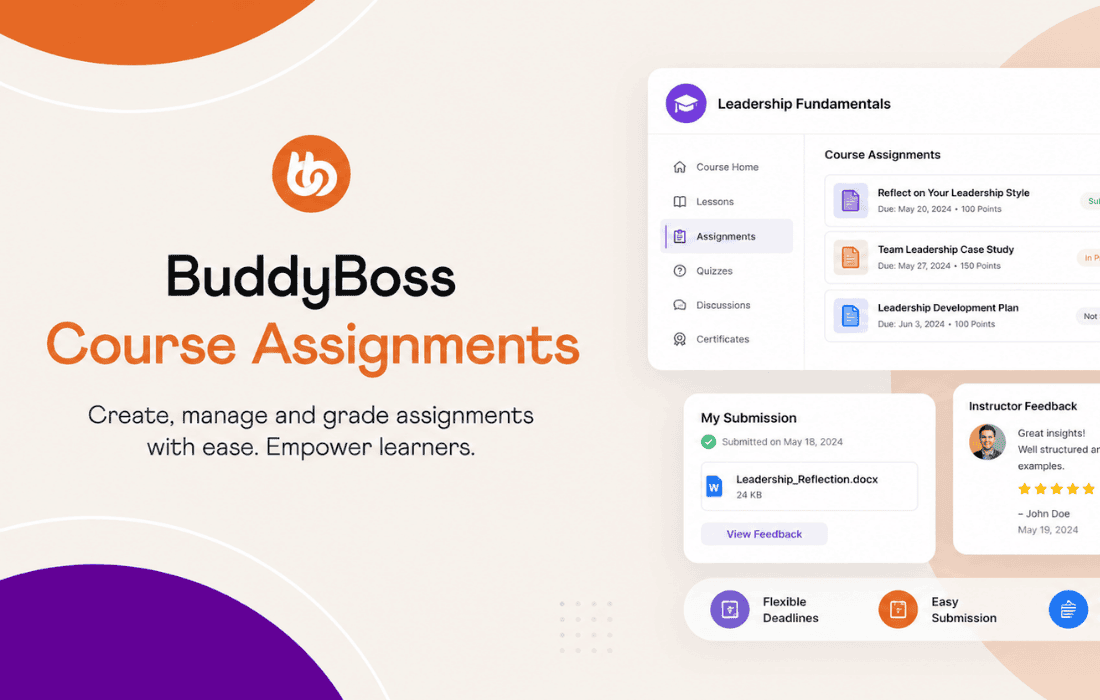
 The BuddyBoss Course Assignments plugin is a powerful extension designed to enhance the learning management capabilities of the BuddyBoss Platform. By integrating seamlessly with the BuddyBoss LMS, this tool allows instructors to create, manage, and grade student assignments, transforming a standard course into an interactive and accountable educational experience. It bridges the gap between passive content consumption and active learning by providing a structured workflow for students to submit work and for educators to provide meaningful feedback.
At its heart, the BuddyBoss Course Assignments plugin introduces a dedicated assignment post type that can be attached to any lesson within a course. This allows course creators to define specific requirements for students, such as writing essays, uploading project files, or submitting links to external work. The workflow is designed to be intuitive for both the instructor and the learner, ensuring that the administrative burden of managing student submissions remains minimal.
When a student reaches a lesson containing an assignment, they are presented with a clear interface to upload their work. The plugin supports various file types, allowing for flexibility in how students demonstrate their knowledge. Once a submission is made, the instructor is notified, and the assignment enters a pending state. This status tracking is vital for maintaining an organized classroom, as it allows instructors to see at a glance which students have completed their tasks and which are still in progress.
The grading system within BuddyBoss Course Assignments is built to facilitate constructive communication. Instructors can review submissions directly from the WordPress dashboard, where they can evaluate the content, provide written feedback, and assign a grade. This feedback loop is essential for student growth, as it allows instructors to clarify concepts, offer praise, or suggest improvements on specific areas of the assignment.
The plugin also handles the status of the assignment once it has been graded. Instructors can mark an assignment as “Approved” or “Needs Revision.” If an assignment requires revision, the student is notified, allowing them to resubmit their work based on the instructor’s comments. This iterative process mimics a real-world academic environment, encouraging students to refine their skills until they meet the course standards.
For the student, the BuddyBoss Course Assignments plugin provides a centralized dashboard to track their academic performance. Students can view their submitted assignments, check the status of their grades, and read feedback provided by their instructors. This transparency helps students stay motivated and aware of their progress throughout the duration of the course.
Furthermore, the integration with the BuddyBoss LMS means that assignments can be tied to lesson completion requirements. An instructor can set a rule where a lesson is not marked as “complete” until the associated assignment has been submitted and approved. This ensures that students engage with the material thoroughly before moving on to more advanced topics, maintaining the integrity of the learning path.
The versatility of the BuddyBoss Course Assignments plugin makes it suitable for a wide range of applications. In an academic setting, teachers can use it to collect homework, essays, and research papers, providing a digital paper trail for every student. The ability to track submissions and provide detailed feedback makes it an excellent tool for distance learning and hybrid classrooms.
In a corporate training environment, the plugin serves as a way to verify that employees have understood and applied the training material. For example, a company conducting a compliance training course might require employees to upload a signed document or a summary of a specific policy. By using the assignment feature, the training manager can verify that the employee has completed the task, ensuring compliance and accountability across the organization.
One of the primary advantages of this plugin is its deep integration with the BuddyBoss ecosystem. Because it is built specifically for the BuddyBoss Platform, it inherits the same design language and user experience standards. This consistency reduces the learning curve for both administrators and users, as the interface feels like a native part of the site rather than a bolted-on addition.
Administrators benefit from the centralized management of all assignments. They can easily filter submissions by course, lesson, or student, making it simple to generate reports or identify bottlenecks in the learning process. The plugin is also designed to be lightweight, ensuring that it does not negatively impact the performance of the site, even when handling a large volume of student submissions and file uploads.
To get the most out of the BuddyBoss Course Assignments plugin, course creators should be clear about their expectations. Providing detailed instructions within the assignment description helps reduce confusion and ensures that students submit work that aligns with the learning objectives. It is also recommended to establish a clear policy regarding revisions, so students understand how many opportunities they have to improve their work.
Instructors should also leverage the notification system to keep students engaged. Timely feedback is one of the most significant factors in student retention and satisfaction. By responding to submissions promptly, instructors can maintain the momentum of the course and keep students motivated to complete their lessons. Utilizing the “Needs Revision” status effectively can also turn a simple submission into a valuable learning opportunity.
When deploying the BuddyBoss Course Assignments plugin, site administrators should ensure that their server environment is configured to handle file uploads appropriately. Depending on the nature of the assignments, this may involve adjusting PHP upload limits and ensuring that the storage directory has the necessary permissions. Additionally, because the plugin handles user-generated content, it is important to implement security best practices to scan uploaded files and protect the site from malicious uploads.
The plugin is highly compatible with the broader BuddyBoss ecosystem, including themes and other extensions. This modularity allows site owners to build a robust learning management system that can grow alongside their needs. Whether you are running a small membership site or a large-scale enterprise training portal, the plugin provides the necessary tools to manage student work effectively.


