

Updates for one year, unlimited sites, auto updates, and regular updates.
$3.99
 BookmarkBookmarked
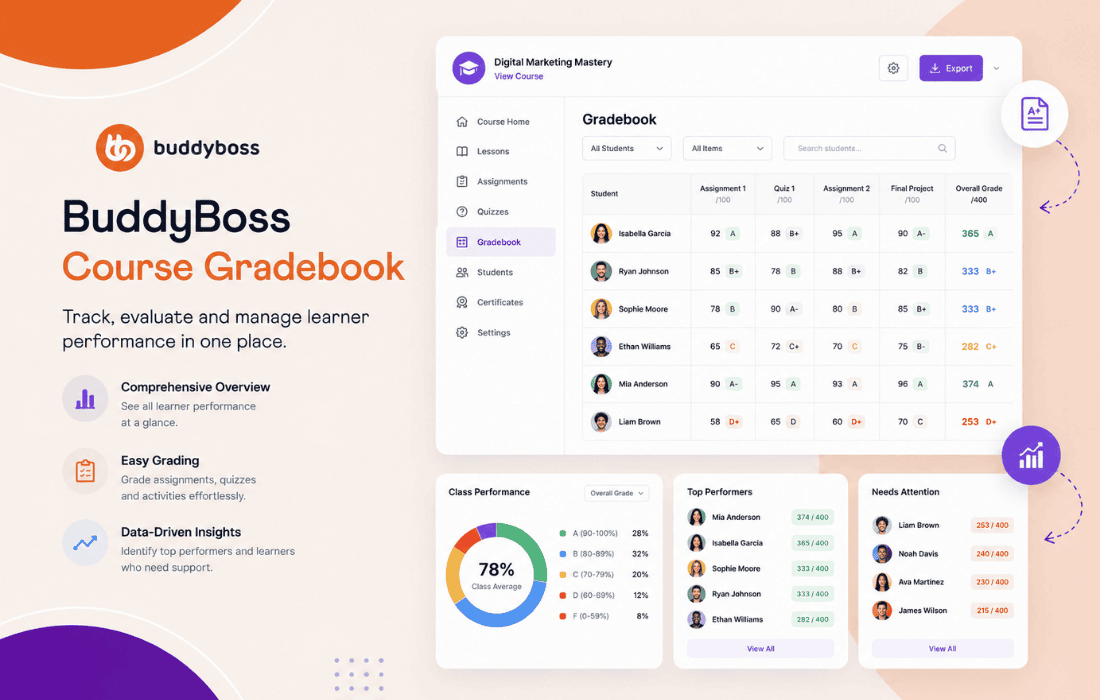
 The BuddyBoss Course Gradebook is a specialized extension designed to integrate seamlessly with the BuddyBoss Platform and the LearnDash LMS ecosystem. It serves as a centralized hub for instructors and administrators to track, manage, and report on student performance across various courses. By providing a comprehensive view of grades, assignments, and quiz results, this plugin empowers educators to maintain academic standards and provide timely feedback to learners within a unified WordPress interface.
At its foundation, the BuddyBoss Course Gradebook acts as a bridge between raw student data and actionable insights. In a standard LearnDash setup, tracking progress across multiple courses can become fragmented. This plugin consolidates that data into a structured grid format, allowing for a bird’s-eye view of student achievement. It is built specifically to respect the architecture of the BuddyBoss theme and platform, ensuring that the user interface remains consistent with the social-learning environment that BuddyBoss is known for.
The primary utility of the plugin lies in its ability to automate the aggregation of scores. Whether a student is completing a series of lessons, submitting manual assignments, or taking automated quizzes, the Gradebook captures these metrics in real-time. This eliminates the need for manual spreadsheet maintenance, which is often prone to human error and time-consuming administrative overhead.
Instructors benefit from a streamlined dashboard that simplifies the grading process. The plugin provides a clear interface where educators can view individual student profiles and their corresponding grades. This allows for quick identification of students who may be struggling and require additional support or intervention.
Transparency is a critical component of successful online learning. The BuddyBoss Course Gradebook provides students with a clear understanding of their academic standing. By accessing their own grade reports, students can track their progress, identify areas for improvement, and stay motivated throughout their learning journey.
When students can see their grades in a structured format, it fosters a sense of accountability. They are no longer left wondering about their status in a course; instead, they have a clear roadmap of what has been completed and what remains to be done. This self-service access to performance data reduces the number of administrative inquiries sent to instructors, allowing educators to focus more on teaching and less on answering basic questions about course status.
For site administrators, the plugin offers robust tools for managing large-scale educational environments. Whether managing a small cohort or a large enterprise training program, the ability to generate reports is essential for compliance and quality assurance.
The versatility of the plugin makes it suitable for a wide range of educational and professional development scenarios. In a corporate training environment, for instance, the Gradebook can be used to track employee compliance with mandatory training modules. Managers can quickly see which team members have completed their certifications and which ones are lagging behind.
In an academic or coaching setting, the plugin supports a more personalized approach to teaching. Instructors can use the data to identify patterns in student performance. For example, if a large percentage of students consistently score low on a specific quiz, the instructor can infer that the course material for that section may need to be revised or supplemented with additional resources.
Because the BuddyBoss Course Gradebook is designed to work within the BuddyBoss ecosystem, it utilizes the existing user database and permission structures. This means that there is no need to create separate user accounts or manage complex synchronization tasks between different platforms. The plugin hooks directly into the LearnDash data points, ensuring that it remains lightweight and performant even as the number of students and courses grows.
The plugin is also built with responsiveness in mind. As BuddyBoss is a mobile-first platform, the Gradebook interface is designed to be accessible across various devices. Whether an instructor is reviewing grades on a desktop computer or a student is checking their progress on a tablet, the experience remains intuitive and functional.
To get the most out of the BuddyBoss Course Gradebook, it is recommended that administrators establish clear grading criteria before launching courses. Defining how much weight is given to quizzes versus assignments ensures that the final grade accurately reflects the student’s mastery of the subject matter.
Furthermore, regular communication with students regarding their access to the Gradebook is essential. Encouraging students to check their progress regularly helps them take ownership of their learning. Instructors should also establish a routine for reviewing the Gradebook, perhaps on a weekly basis, to ensure that manual grading tasks are completed in a timely manner, thereby keeping the student feedback loop active.
While the BuddyBoss Course Gradebook is highly optimized for the BuddyBoss and LearnDash ecosystem, there are other solutions available for WordPress-based learning management systems. Users looking for alternatives may consider the following:
In conclusion, the BuddyBoss Course Gradebook is an essential tool for any organization using the BuddyBoss Platform and LearnDash to deliver educational content. By providing a centralized, efficient, and user-friendly way to manage student performance, it bridges the gap between content delivery and academic assessment. Its deep integration with the BuddyBoss ecosystem ensures a seamless experience for both instructors and students, ultimately contributing to a more effective and transparent online learning environment.


