

Updates for one year, unlimited sites, auto updates, and regular updates.
$3.99
 BookmarkBookmarked
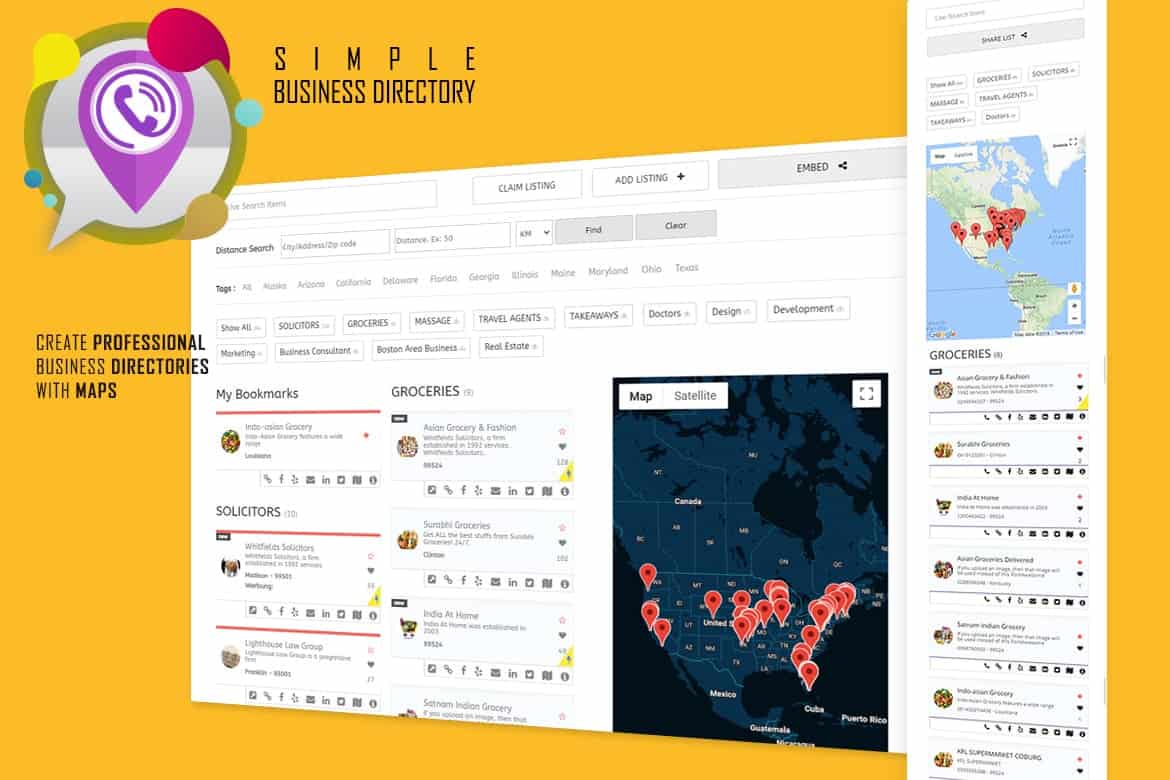
 The ‘Business Directory with Maps, Store Locator’ WordPress plugin stands out as an indispensable tool for website owners aiming to provide their audience with a robust and intuitive way to discover businesses and services. It transforms a standard website into a dynamic hub where users can effortlessly locate establishments, explore offerings, and navigate their surroundings with the aid of interactive maps and a powerful store locator function. Designed with user experience at its core, this plugin simplifies the process of creating, managing, and presenting a comprehensive directory, making it an invaluable asset for a diverse range of online platforms.
In an increasingly digital world, the ability for customers to quickly and easily find local businesses and services is paramount. The ‘Business Directory with Maps, Store Locator’ plugin addresses this critical need by providing a comprehensive solution for creating a detailed online directory. It’s more than just a list; it’s an interactive platform that connects users with relevant businesses based on their location, preferences, and specific needs. This plugin empowers websites to become a go-to resource for local discovery, fostering engagement and driving traffic to listed establishments.
The core value proposition of this plugin lies in its capacity to bridge the gap between online search and real-world interaction. By integrating advanced mapping technology with a user-friendly directory interface, it ensures that visitors can not only find what they’re looking for but also visualize its proximity and plan their visit. This seamless integration of information and navigation significantly enhances the overall user journey, making the website a more valuable and frequently visited resource.
At the heart of the ‘Business Directory with Maps, Store Locator’ plugin is its ability to facilitate the creation of a truly detailed business directory. This goes beyond mere names and addresses, allowing for a rich tapestry of information that helps users make informed decisions. Coupled with interactive maps and a convenient store locator, the plugin offers a complete package for local search and discovery.
Creating Detailed Business Listings
A “detailed business directory” implies the capacity to store and display a wealth of information for each listing. This typically includes, but is not limited to, the business name, full address, contact details such as phone numbers and email addresses, and a link to the business’s website. Furthermore, the plugin allows for comprehensive descriptions of the business, its services, and products, giving users a clear understanding of what each establishment offers. The ability to include operating hours is also a crucial aspect of a detailed listing, providing customers with essential information for planning their visits. This depth of information ensures that users have all the necessary facts at their fingertips, reducing the need for further external searches and keeping them engaged with your directory.
The emphasis on detail ensures that each business listing serves as a mini-profile, offering a holistic view to potential customers. This not only benefits the end-user by providing clarity but also adds significant value to the businesses being listed, giving them a robust online presence within the directory. The structured nature of these detailed listings also aids in search engine optimization, making the directory itself more discoverable and, by extension, the businesses within it.
The Power of Interactive Maps
Interactive maps are a cornerstone of this plugin’s functionality, transforming static location data into a dynamic visual experience. These maps allow users to see the precise geographical placement of businesses, often represented by customizable pins or markers. Users can zoom in and out, pan across different regions, and explore the vicinity of a particular business. This visual context is incredibly powerful, helping users to orient themselves and understand the spatial relationships between various listings.
Beyond simple display, interactive maps often provide additional functionalities such as clicking on a business pin to reveal a pop-up with key information, including the business name, address, and a link to its full directory listing. Crucially, these maps can also offer directions from a user’s current location or a specified starting point directly to the business, streamlining the navigation process. This level of interactivity makes finding businesses not just efficient but also engaging, significantly enhancing the user experience on the website.
Seamless Store Location for Users
Complementing the interactive maps is the convenient store locator feature, designed to make finding businesses near a user’s location incredibly straightforward. This functionality typically involves a search interface where users can input an address, city, or even just a postcode. The locator then processes this input and displays relevant businesses, often within a specified radius, making it ideal for local searches.
The convenience factor is paramount here. Users don’t need to manually browse through endless lists; instead, they can quickly pinpoint businesses that are most relevant to their immediate geographical needs. The results are usually presented in an easy-to-read format, often alongside the interactive map, allowing users to switch between a list view and a map view seamlessly. This dual presentation ensures that users can consume information in the way that best suits their preferences, further solidifying the plugin’s commitment to a superior user experience.
A key strength of the ‘Business Directory with Maps, Store Locator’ plugin lies in its customizable features. These capabilities ensure that the directory not only functions effectively but also integrates seamlessly with the aesthetic and operational needs of any website. Customization is vital for tailoring the user experience, making it intuitive, relevant, and visually appealing.
Organizing with Categories
The ability to showcase stores by category is a fundamental aspect of any well-organized directory. This feature allows website administrators to classify businesses into logical groups, such as “Restaurants,” “Retail Stores,” “Healthcare Services,” or “Automotive Repair.” For users, this means they can easily filter and browse listings based on their specific interests or needs, significantly narrowing down their search and making discovery more efficient.
Categorization not only improves navigability but also enhances the overall structure of the directory. It prevents information overload and helps users quickly hone in on the types of businesses they are looking for. Furthermore, well-defined categories can contribute to better search engine visibility for specific niches within the directory, attracting more targeted traffic to the website.
Location-Based Showcasing
Beyond general categories, the plugin excels at showcasing businesses based on their location. This can involve filtering by city, state, region, or even by a specific radius around a user-defined point. For websites serving a diverse geographical audience, or those focused on local commerce, this feature is invaluable. It allows users to quickly find businesses that are geographically relevant to them, whether they are planning a trip, looking for a service in their neighborhood, or exploring options in a new area.
Location-based showcasing is particularly powerful when combined with the interactive maps, allowing users to visually explore businesses within a defined geographical area. This capability is crucial for enhancing the local search experience, making the directory an essential tool for anyone seeking services or products within a specific vicinity.
Beyond Categories and Locations: Flexible Display Options
The phrase “and more” in the plugin summary hints at a broader range of customizable features that extend beyond just categories and locations. This typically encompasses various display options that allow website owners to control how the directory and its listings are presented on the frontend. Such customizations might include different layout styles for listing results (e.g., grid view, list view), options for how search forms are displayed, and the ability to sort results by various criteria like distance, name, or rating (if applicable).
These flexible display options are crucial for ensuring that the directory integrates seamlessly with the website’s existing design and branding. Website owners can often adjust colors, fonts, and other visual elements to maintain a consistent look and feel. The ability to customize the search interface, including the fields available for filtering, further empowers administrators to tailor the user experience to their specific audience and the nature of the businesses being listed. This level of control over presentation and interaction is key to creating a truly user-friendly and effective directory.
The ‘Business Directory with Maps, Store Locator’ plugin offers a multitude of benefits, catering to both the administrators managing the directory and the end-users interacting with it. Its design philosophy centers on creating a win-win scenario where efficiency meets discovery.
For Website Owners: Streamlined Management and Engagement
For website owners, the plugin acts as a user-friendly tool that simplifies the often complex task of managing a business directory. Its intuitive backend interface means that adding, editing, and organizing business listings is straightforward, requiring minimal technical expertise. This ease of management saves valuable time and resources, allowing administrators to focus on growing their directory and enhancing its content.
Beyond management, the plugin significantly boosts website engagement. By offering a valuable resource for local discovery, it encourages visitors to spend more time on the site, exploring listings and utilizing the interactive maps. This increased stickiness can lead to higher page views, lower bounce rates, and a stronger overall online presence. A well-maintained and feature-rich directory can also position the website as an authoritative source for local information, attracting a loyal user base and potentially opening avenues for collaboration with local businesses.
For Website Visitors: Effortless Discovery and Navigation
For the end-user, the primary benefit is the effortless discovery of businesses and services. The combination of detailed listings, interactive maps, and a convenient store locator eliminates the frustration often associated with finding specific local information. Users can quickly pinpoint what they need, where it is, and how to get there, all within a single, cohesive interface.
This streamlined experience saves users time and effort, making their decision-making process much simpler. Whether they are looking for a specific type of restaurant, a nearby service provider, or a retail store in an unfamiliar area, the plugin provides immediate, relevant results. The visual aid of maps, coupled with comprehensive business details, instills confidence and trust, ensuring that visitors have a positive and productive experience every time they use the directory.
The versatility of the ‘Business Directory with Maps, Store Locator’ plugin makes it suitable for a wide array of applications across various industries and website types. Its core functionality of connecting users with businesses based on location and category can be adapted to numerous scenarios.
A recurring theme in the description of ‘Business Directory with Maps, Store Locator’ is its user-friendly nature. This philosophy permeates both the backend administration and the frontend user experience. For website administrators, the plugin is designed to be intuitive, allowing for easy setup and management of listings without requiring extensive technical knowledge. This means that adding new businesses, updating existing information, and configuring display options can be done efficiently through a clear and accessible interface.
On the frontend, the user-friendly design translates into a seamless and enjoyable experience for visitors. The search functionality is straightforward, the maps are easy to navigate, and the presentation of business details is clear and concise. This focus on ease of use ensures that visitors can quickly find the information they need, reducing frustration and encouraging repeat visits. The plugin’s commitment to user-friendliness is a significant factor in its effectiveness as a tool for local discovery and engagement.
As a WordPress plugin


