

Updates for one year, unlimited sites, auto updates, and regular updates.
$3.99
 BookmarkBookmarked
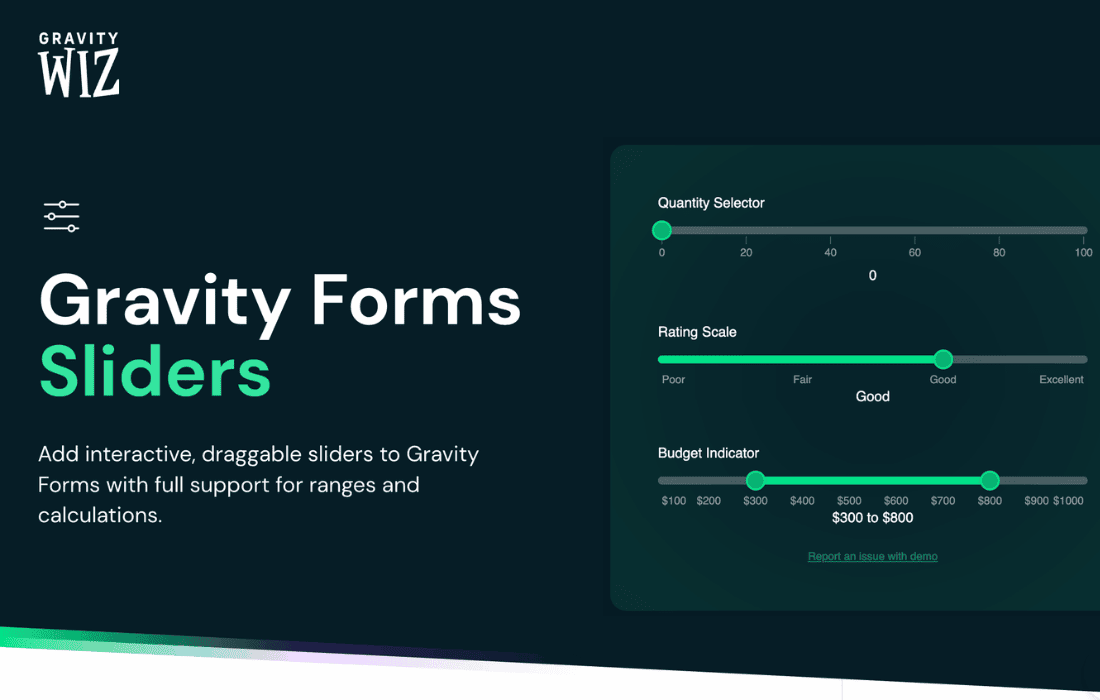
 Gravity Forms GP Sliders is a specialized enhancement for the WordPress ecosystem, specifically designed to work as part of the Gravity Perks suite by Gravity Wiz. This plugin serves a critical role in modernizing the user interface of web forms by converting standard, often uninspiring numeric input fields into interactive, touch-friendly sliders. By prioritizing user experience and visual feedback, GP Sliders allows form creators to gather precise data while reducing the cognitive load on the user. Whether it is for a simple rating system or a complex financial calculator, this tool provides the necessary flexibility to bridge the gap between technical data collection and intuitive design.
In the early days of web development, data entry was largely restricted to text boxes and radio buttons. While functional, these elements often felt clinical and failed to engage the user. As the web moved toward a more mobile-centric and interactive model, the need for tactile elements became apparent. Gravity Forms GP Sliders addresses this evolution by providing a solution that feels native to modern browsers and mobile devices. Instead of forcing a user to click into a box and type a number, they can now slide a handle across a track, receiving instant visual confirmation of their selection. This interaction is not just about aesthetics; it is about reducing friction in the conversion funnel.
When a user encounters a long form with multiple numeric inputs, “form fatigue” can set in quickly. Sliders break up the monotony of text entry, making the process feel more like a guided configuration than a data-entry chore. For developers and site owners, this means higher completion rates and more accurate data, as users are more likely to engage with a slider to find a specific value than they are to type it manually, especially on smaller screens where virtual keyboards can be cumbersome.
The primary function of GP Sliders is to transform the standard “Number” field in Gravity Forms into a slider. However, the plugin goes far beyond a simple visual swap. It introduces a layer of customization that allows the form administrator to define exactly how the slider behaves and how it communicates with the user. This includes setting minimum and maximum bounds, defining step increments, and choosing between single-value sliders or range sliders.
Single and Dual Handle Support
One of the most powerful features of GP Sliders is its support for both single and dual handles. A single handle is ideal for selecting a specific point on a scale, such as a user‚Äôs age or a desired quantity. A dual handle, or “Range Slider,” allows users to select a span between two values. This is particularly useful for filtering results, such as a price range in a product catalog or a time window in a booking form. By providing both options, GP Sliders ensures that it can handle a wide variety of data collection scenarios without requiring additional third-party scripts.
Real-Time Tooltips and Visual Feedback
To ensure accuracy, GP Sliders includes built-in tooltip functionality. As the user moves the slider handle, a small bubble or label follows the movement, displaying the current value in real-time. This eliminates the guesswork associated with “blind” sliders where the user might not know the exact value until they release the mouse or lift their finger. These tooltips can be customized to show prefixes or suffixes, such as currency symbols or units of measurement like “kg” or “miles,” providing immediate context to the data being entered.
Customizable Step Increments
Not every numeric input requires a granular, one-by-one increase. In many cases, such as choosing a budget or a quantity of items sold in bulk, it makes more sense to move in larger increments. GP Sliders allows administrators to define “steps.” For example, a slider could be configured to move only in increments of 10, 50, or 100. This constraints the user to valid options and prevents the submission of “messy” data that the backend system might not be equipped to handle. The smooth animation between these steps ensures that the user still feels in control of the movement.
A plugin that focuses on user interface must be highly customizable to match the branding of the website it inhabits. GP Sliders provides several avenues for aesthetic control, ranging from simple settings in the Gravity Forms editor to advanced CSS hooks for developers. The goal is to ensure that the slider does not look like a generic add-on but rather a bespoke part of the site’s design language.
The plugin offers various “skins” or styles that can be applied to the sliders. These styles dictate the thickness of the track, the shape of the handle (circular, square, or custom), and the color palette of the active and inactive states. For those who need even more control, the plugin generates clean, semantic HTML and CSS classes. This allows designers to use custom CSS to change gradients, add shadows, or even animate the handle when it is hovered over. Because it is built on top of the robust Gravity Forms framework, these styles are applied consistently across different browsers, ensuring a uniform experience for all users.
The versatility of GP Sliders makes it applicable across numerous industries and form types. By understanding how this tool can be applied in real-world scenarios, site owners can better leverage its capabilities to improve their business processes.
Financial and Mortgage Calculators
Financial forms are notoriously intimidating. When a user is trying to calculate a potential mortgage payment or an investment return, they often want to “play” with the numbers to see how different variables affect the outcome. Using GP Sliders for loan amounts, interest rates, and term lengths allows users to see immediate changes in their calculated results (when paired with Gravity Forms’ calculation features). This interactive element keeps the user on the page longer and provides a sense of transparency and control over the financial data.
Customer Feedback and Satisfaction Surveys
Traditional Likert scales (1-5 or 1-10) are a staple of customer feedback. However, a slider can offer a more nuanced way for customers to express their satisfaction. Instead of choosing a discrete “4,” a user might slide to a “4.5” to indicate they were very happy but felt there was a tiny bit of room for improvement. This granular data can be invaluable for businesses looking for deep insights into customer sentiment. Furthermore, the visual nature of the slider makes the survey feel less like a test and more like an interactive experience, which can improve response rates.
Product Configuration and Filtering
For e-commerce sites or service providers with tiered pricing, GP Sliders can act as a configuration tool. A user might slide to select the number of users they need for a software subscription, or the amount of storage required for a hosting plan. As the slider moves, the price can update dynamically on the screen. This creates a “build-your-own” feel that is highly effective in modern sales funnels. Additionally, for directory sites, range sliders are the gold standard for filtering results by price, distance, or year of manufacture.
One of the greatest strengths of GP Sliders is that it does not exist in a vacuum. As part of the Gravity Perks suite, it is designed to work in harmony with dozens of other “perks” that extend Gravity Forms in various ways. This ecosystem approach allows for complex logic and functionality that would be difficult to achieve with standalone plugins.
Despite its advanced capabilities, GP Sliders is designed to be accessible to users of all technical skill levels. Once the perk is activated, a new “Slider” tab or section appears within the settings of compatible fields in the Gravity Forms editor. From here, the administrator can toggle the slider functionality on or off with a single click.
The configuration panel is intuitive, offering clear fields for defining the range and behavior. Users can specify the start and end points, the default starting position of the handle, and whether the value should be displayed as a tooltip or a static label. For developers, the plugin provides hooks and filters that allow for programmatic changes to the slider’s behavior. This means you can dynamically alter slider settings based on the user’s role, the page they are viewing, or other environmental factors in WordPress.
In modern web development, accessibility is not optional. Gravity Wiz has taken steps to ensure that GP Sliders remains usable for individuals who rely on assistive technologies. The sliders are built to be keyboard-accessible, meaning users can use the arrow keys to move the handle and adjust values. Proper ARIA labels are utilized to ensure that screen readers can communicate the purpose of the slider and its current value to the user.
Mobile optimization is another area where GP Sliders excels. Standard HTML5 range inputs can sometimes be difficult to manipulate on touchscreens if they are too small or lack responsive feedback. GP Sliders uses touch-optimized libraries that ensure the handle is easy to “grab” with a thumb and that the movement is fluid and lag-free. This is essential for maintaining a professional appearance on smartphones and tablets, where a significant portion of web traffic now originates.
Adding interactive elements to a website often raises concerns about page load speeds and performance. GP Sliders is built with efficiency in mind. It loads minimal JavaScript and CSS, ensuring that the impact on site performance is negligible. Because it leverages the existing Gravity Forms infrastructure, it doesn’t need to load a massive framework to function. Furthermore, as a product of Gravity Wiz, the plugin receives regular updates to maintain compatibility with the latest versions of WordPress and Gravity Forms, ensuring long-term reliability for mission-critical forms.
While GP Sliders is a robust choice for those already using the Gravity Perks ecosystem, there are other options available in the WordPress market for creating sliders within forms. If you are looking for alternatives or similar functionality, you may consider the following:
In conclusion, Gravity Forms GP Sliders is an essential tool for any WordPress administrator looking to elevate their forms from basic data collection points to interactive user experiences. Its combination of ease of use, deep customization, and seamless integration with the Gravity Perks suite makes it a standout choice for improving form engagement and data accuracy.


