

Updates for lifetime, unlimited sites, unlimited downloads, and regular updates.
$3.99
 BookmarkBookmarked
Makerspace – FabLab & Community Workshop WordPress Theme is a comprehensive and specialized digital solution designed specifically for the modern maker movement. As creative hubs, technical laboratories, and collaborative workshops continue to grow in popularity across the globe, the need for a robust online presence that can handle the unique demands of these spaces has become paramount. This theme provides a sophisticated platform for FabLabs, hackerspaces, woodworking shops, 3D printing studios, and community-driven innovation centers to showcase their facilities, manage their memberships, and foster a vibrant community of creators. By blending industrial aesthetics with high-end functionality, the theme ensures that any technical or creative organization can present a professional image while providing practical tools for its members and visitors alike.
The Makerspace – FabLab & Community Workshop WordPress Theme is built upon the philosophy that creation should be accessible, organized, and community-oriented. In the current era of rapid prototyping and DIY culture, a website for a workshop must do more than just provide contact information; it must serve as a digital extension of the physical space. This theme is engineered to bridge that gap, offering a digital environment where users can discover new tools, sign up for safety certifications, browse upcoming workshops, and share their latest projects. It addresses the specific logistical challenges faced by workshop managers, such as scheduling expensive machinery like CNC routers or laser cutters, while also providing a welcoming interface for beginners who are just starting their making journey.
At its core, the theme is designed to support the educational mission of FabLabs and community workshops. It recognizes that these spaces are often centers for lifelong learning, where knowledge is shared freely among members. Therefore, the theme includes dedicated structures for documenting processes, listing equipment specifications, and highlighting the expertise of resident mentors and instructors. Whether the goal is to attract new corporate sponsors, manage a busy schedule of public classes, or simply provide a gallery for local artisans to display their work, this theme offers the structural integrity and aesthetic flexibility required to succeed in the competitive landscape of creative spaces.
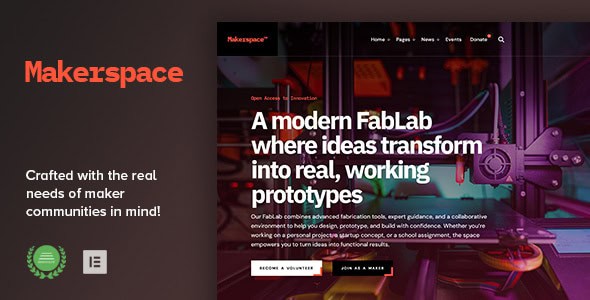
The visual identity of the Makerspace theme is characterized by a clean, industrial, and highly functional design language. It avoids unnecessary clutter, opting instead for a layout that prioritizes information hierarchy and ease of navigation. The design reflects the environment of a well-organized workshop—everything has its place, and the most important tools are always within reach. Utilizing a grid-based system, the theme ensures that content remains aligned and professional across all screen sizes, from large desktop monitors in a design studio to mobile devices used on the shop floor.
The layout options are diverse, offering multiple homepage variations that cater to different types of organizations. For instance, a high-tech FabLab might choose a layout that emphasizes its cutting-edge machinery and technical specifications, while a community pottery studio might opt for a design that highlights upcoming classes and student galleries. The theme makes extensive use of high-quality typography and generous white space to ensure that technical documentation and long-form blog posts are easy to read. Furthermore, the color palettes are typically inspired by industrial materials—think slate grays, deep blues, and safety oranges—though these are fully customizable to match any existing brand identity.
Attention to detail is evident in the custom-designed icons and UI elements that represent various maker activities, such as soldering, 3D modeling, and carpentry. These visual cues help users navigate the site intuitively. The responsive nature of the layout means that the complex tables used for equipment specs or the dense calendars used for workshop schedules remain legible and interactive on smartphones. This mobile-first approach is essential for makers who often need to check tool availability or reference a tutorial while they are actively working on a project away from a computer.
The Makerspace – FabLab & Community Workshop WordPress Theme is versatile enough to serve a wide range of organizations within the creative and technical sectors. One primary use case is the university-affiliated FabLab. In an academic setting, the theme can be used to manage student access to specialized equipment, host research project portfolios, and provide a central repository for technical tutorials and safety documentation. The structured layout helps maintain a professional academic standard while still encouraging the creative experimentation that is central to the maker movement.
Another significant use case is the non-profit community workshop. These organizations often rely on a mix of memberships, grants, and public classes to stay operational. The theme’s ability to clearly outline membership benefits and showcase the impact of the workshop through project galleries makes it an excellent tool for both recruitment and fundraising. By highlighting the community aspect—such as member spotlights and collaborative builds—the theme helps build the social capital necessary for a non-profit space to thrive.
Commercial prototyping studios and “maker-for-hire” businesses also find great value in this theme. For these entities, the website serves as a portfolio and a service menu. The clean, professional design instills confidence in potential B2B clients who may need 3D printing, laser cutting, or small-batch manufacturing services. The integration of e-commerce capabilities allows these businesses to sell standardized parts or design services directly to customers, streamlining the transition from a physical workshop to a digital storefront.
Finally, the theme is ideal for public libraries and community centers that are incorporating “Maker Corners” into their facilities. As libraries evolve into centers for digital literacy and hands-on learning, they require a web presence that can explain these new services to a general audience. The Makerspace theme provides the perfect balance of instructional clarity and visual appeal to introduce the public to concepts like robotics, electronics, and traditional crafts in a non-intimidating way.
To ensure maximum functionality, the Makerspace theme is designed to integrate seamlessly with the most popular and powerful plugins in the WordPress ecosystem. At the forefront is its compatibility with leading page builders, which allows users to create complex, custom layouts without writing a single line of code. This drag-and-drop functionality is essential for workshop managers who may not have extensive web development experience but need to update their site frequently with new equipment or event details.
For organizations looking to monetize their space, the theme offers deep integration with WooCommerce. This allows for the creation of a sophisticated online store where the workshop can sell everything from physical materials like plywood and filament to digital products like CNC files and project templates. The checkout process is optimized for user experience, ensuring that transactions are secure and straightforward. Additionally, the theme is compatible with various booking and reservation plugins, enabling members to reserve specific time slots on machines, which is a critical requirement for managing high-demand tools in a busy workshop.
Communication is key in any community, and the theme supports this through compatibility with major contact form plugins and newsletter integration tools. This ensures that the workshop can maintain a robust mailing list, send out automated updates about new classes, and handle inquiries from potential members efficiently. For international organizations or those located in multilingual communities, the theme is translation-ready and compatible with popular translation plugins, allowing the site to reach a broader audience and foster a truly inclusive maker environment.
Flexibility is a core tenet of the Makerspace – FabLab & Community Workshop WordPress Theme. Recognizing that no two workshops are identical, the theme provides an extensive array of customization options through a centralized theme options panel. Administrators can change the entire look and feel of the site with just a few clicks, adjusting primary and secondary colors, selecting from hundreds of Google Fonts, and modifying the header and footer styles to suit their specific needs. This level of control ensures that the website can grow and evolve alongside the physical space.
The theme’s modular design means that individual sections can be enabled or disabled as needed. If a workshop does not yet have a retail component, the e-commerce features can remain hidden until they are required. Conversely, if an organization focuses heavily on documentation, the blog and portfolio sections can be expanded and prioritized. The use of custom post types for equipment and workshops means that data is organized logically in the backend, making it easy to manage even as the inventory of tools and the library of classes grow into the hundreds.
For developers and advanced users, the theme is built with clean, well-documented code that follows WordPress best practices. This makes it easy to create child themes for more extensive modifications or to add custom functions that meet highly specific organizational requirements. Whether it is integrating a custom API for a door-access system or creating a unique member dashboard, the Makerspace theme provides a solid and extensible foundation. This combination of user-friendly tools for beginners and deep customizability for experts makes it a long-term solution for any community workshop or technical laboratory.


