

Updates for lifetime, unlimited sites, unlimited downloads, and regular updates.
$3.99
 BookmarkBookmarked
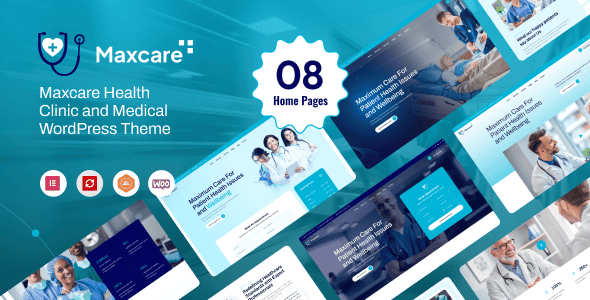
Maxcare – Health & Medical WordPress Theme is a comprehensive digital solution specifically engineered to meet the demanding requirements of the modern healthcare sector. In an era where a medical facility’s online presence is often the first point of contact for patients, this theme provides a professional, trustworthy, and highly functional platform. It bridges the gap between complex medical services and user-friendly web navigation, ensuring that patients can find the information they need, book appointments, and interact with healthcare providers seamlessly. By prioritizing accessibility and clarity, Maxcare empowers medical professionals to build a robust digital identity that reflects their commitment to care and excellence. Whether you are managing a large-scale hospital, a private specialty clinic, or a local dental practice, this theme offers the structural integrity and aesthetic refinement necessary to establish credibility in the competitive medical landscape.
The Maxcare РHealth & Medical WordPress Theme is designed as a versatile and robust framework for healthcare providers who require a sophisticated online presence. The medical industry demands a unique balance of technical functionality and empathetic design, and Maxcare delivers on both fronts. It is built using the latest web development standards, ensuring that the website is not only visually appealing but also fast, secure, and easy to maintain. The theme is developed with a focus on the end-user—the patient—ensuring that critical information such as emergency contact details, office hours, and service lists are easily accessible from any device.
In the modern digital environment, a medical website must serve as more than just a digital brochure; it must be a functional tool that assists in the daily operations of a clinic. Maxcare addresses this by integrating features that streamline patient interactions. From the moment a visitor lands on the homepage, they are greeted with a layout that inspires confidence. The theme utilizes a clean, organized structure that avoids the clutter often found in multipurpose themes, focusing instead on the specific needs of doctors, nurses, and healthcare administrators. By providing a solid foundation for content management, Maxcare allows medical professionals to focus on what they do best: providing care to their patients.
Furthermore, Maxcare is built to be future-proof. As WordPress evolves, the theme remains compatible with the latest versions of the software and its core plugins. This ensures that your medical practice’s website will continue to function optimally as technology advances. The theme’s architecture is optimized for performance, which is a critical factor in both user satisfaction and search engine rankings. With a focus on clean code and efficient resource management, Maxcare provides a high-performance platform that can handle the traffic and data requirements of a busy medical facility.
The design philosophy behind Maxcare is rooted in the principles of professional healthcare aesthetics. It utilizes a clean, minimalist approach that emphasizes white space, which helps to reduce cognitive load for patients who may be visiting the site under stressful circumstances. The color palettes are typically centered around blues, greens, and whites‚Äîcolors traditionally associated with health, cleanliness, and trust. This visual language helps to establish an immediate sense of professionalism and reliability. The layout is structured using a logical hierarchy, ensuring that the most important information, such as “Book an Appointment” buttons or “Emergency Services,” is prominently displayed and easy to find.
Responsiveness is a core component of the Maxcare design. With a significant portion of web traffic now coming from mobile devices, the theme is fully optimized for smartphones and tablets. The responsive grid system ensures that all elements—from complex tables of medical fees to high-resolution imagery of the facility—scale perfectly to fit any screen size. This mobile-first approach is essential for patients who may need to find clinic locations or contact information while on the go. The touch-friendly navigation menus and buttons are designed to be easily clickable, providing a seamless experience across all hardware platforms.
Maxcare also offers a variety of pre-designed layouts and templates that can be imported with ease. These layouts are tailored for different medical niches, such as pediatrics, cardiology, or general practice. Each layout is crafted with attention to detail, featuring custom icons, typography that prioritizes readability, and strategically placed call-to-action sections. The theme supports both boxed and wide layouts, giving site owners the flexibility to choose the style that best fits their brand identity. Additionally, the integration of advanced slider tools allows for the creation of engaging hero sections that can highlight key services, staff members, or recent health news, all while maintaining a professional and clinical appearance.
Maxcare is a versatile theme that can be adapted to a wide range of scenarios within the health and medical industry. One of its primary use cases is for large-scale hospitals and multi-specialty medical centers. In these environments, the theme’s ability to manage multiple departments and a large roster of doctors is invaluable. The department management feature allows the site to be organized logically, such as separating Cardiology, Oncology, and Pediatrics, each with its own set of services and dedicated staff. This organization helps patients find the specific care they need without becoming overwhelmed by the size of the institution.
For private clinics and specialized practices, such as dental offices, eye clinics, or plastic surgery centers, Maxcare provides a platform to highlight specific procedures and expertise. These smaller practices often rely heavily on their reputation and the personal brand of their lead practitioners. The detailed staff profile pages allow these clinics to showcase the experience and certifications of their doctors, while the testimonial sections provide a space for satisfied patients to share their success stories. The appointment booking feature is particularly useful here, as it allows these smaller offices to manage their schedules more efficiently without the need for a dedicated 24/7 reception desk.
Beyond traditional clinical settings, Maxcare is also an excellent choice for wellness centers, rehabilitation clinics, and physical therapy practices. These businesses often focus on long-term care and patient journeys. The theme’s blog and news sections can be used to provide educational content on health and wellness, which helps in engaging the community and establishing the practice as a thought leader in its field. Additionally, the theme can be used by medical laboratories and diagnostic centers to provide information about tests, preparation requirements, and how patients can access their results online, thereby improving the overall efficiency of the diagnostic process.
To ensure maximum functionality, Maxcare is designed to integrate seamlessly with the most popular and powerful plugins in the WordPress ecosystem. For layout and design customization, the theme is fully compatible with leading page builders like Elementor or WPBakery. This compatibility allows site administrators to create complex, custom pages using a visual, drag-and-drop interface, eliminating the need for advanced coding knowledge. This is particularly beneficial for medical marketing teams who need to create landing pages for specific health campaigns or seasonal promotions quickly.
In terms of functionality, Maxcare supports WooCommerce, the most widely used e-commerce platform for WordPress. This integration is essential for medical facilities that sell health-related products, such as supplements, medical equipment, or skincare products. The theme ensures that the online store maintains the same professional and clinical aesthetic as the rest of the site, providing a cohesive shopping experience for patients. Furthermore, the theme is compatible with Contact Form 7 and Ninja Forms, allowing for the creation of complex patient intake forms or simple contact requests that are both secure and easy to use.
Technical compatibility is also a priority, with the theme being optimized for performance plugins like WP Rocket and W3 Total Cache. This ensures that the site remains fast even when loaded with high-resolution images and complex features. For medical practices serving international or diverse local populations, Maxcare is fully compatible with WPML and Polylang. These integrations allow for the creation of a truly multilingual website, ensuring that language barriers do not prevent patients from accessing vital health information. Finally, the theme adheres to WordPress coding standards, ensuring compatibility with the Yoast SEO and Rank Math plugins to help the site achieve optimal visibility in search engines.
Maxcare offers an extensive range of customization options that allow medical practices to tailor the theme to their specific branding and operational needs. At the heart of this flexibility is a powerful theme options panel. From this centralized dashboard, users can control almost every aspect of the site’s appearance, including global color schemes, typography settings, and layout configurations. This means that a clinic can easily match the website’s colors to their physical branding, ensuring a consistent experience for patients across all touchpoints. The live customizer support allows for real-time previews of these changes, making the design process intuitive and efficient.
The flexibility of Maxcare extends to its header and footer builders. Recognizing that different medical facilities have different priorities, the theme allows for various header configurations. For example, a hospital might prioritize an emergency phone number and a “Find a Doctor” search bar in the header, while a wellness center might focus on social media links and a newsletter signup. The footer is equally customizable, providing space for location maps, office hours, accreditation logos, and quick links to important pages. This level of control ensures that the website’s most valuable real estate is used effectively to meet the specific goals of the organization.
For those who require even deeper customization, Maxcare is built with a developer-friendly architecture. It supports child themes, which allows for custom code modifications that will not be overwritten when the main theme is updated. The inclusion of a wide array of custom shortcodes also provides a way to add specific functional elements‚Äîsuch as progress bars, counters for “patients served,” or accordion toggles for FAQs‚Äîanywhere on the site. This combination of user-friendly options for beginners and robust tools for developers makes Maxcare a highly adaptable solution that can grow and change alongside the medical practice it represents.


