

Updates for one year, unlimited sites, auto updates, and regular updates.
$3.99
 BookmarkBookmarked
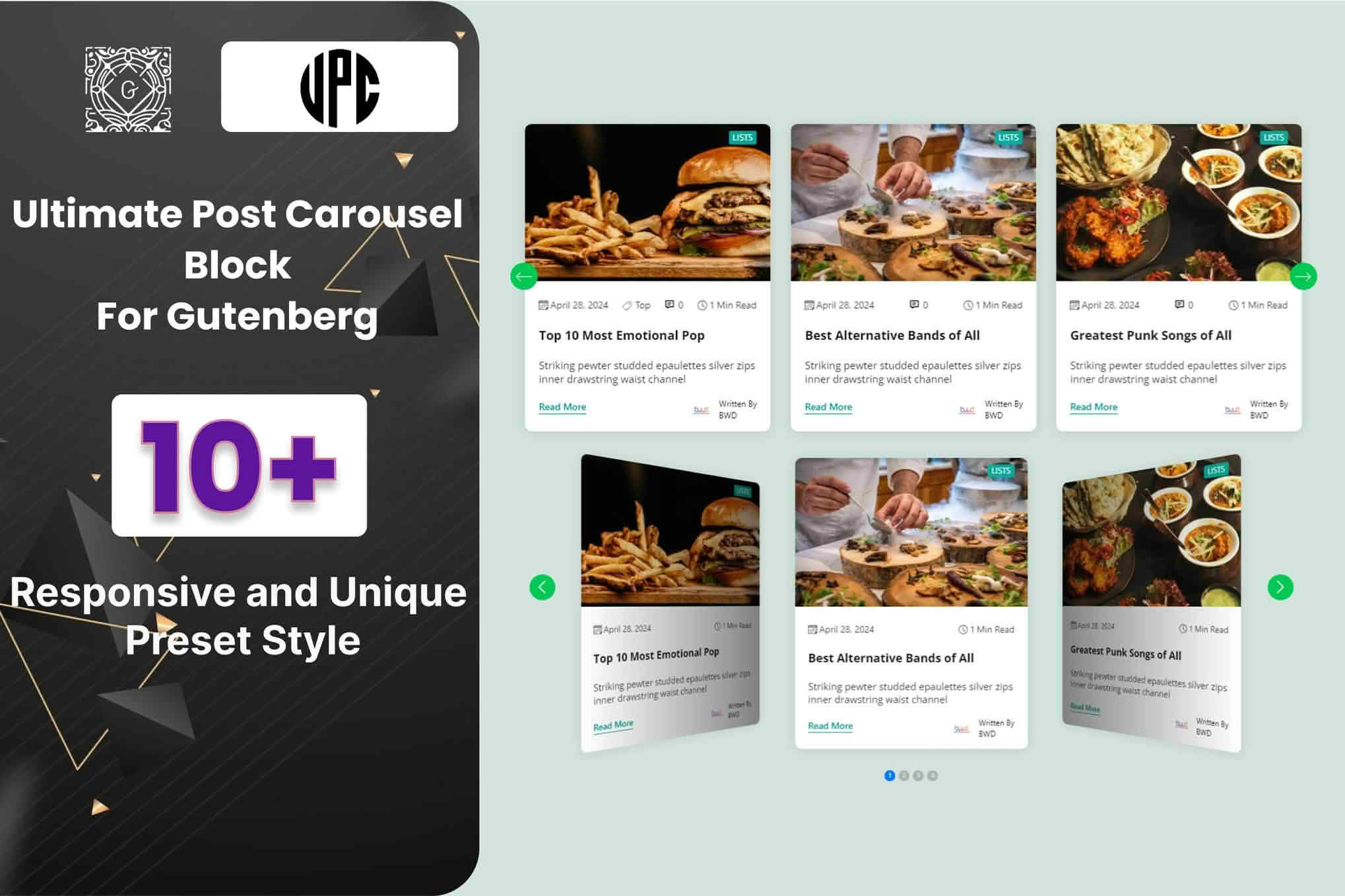
Post Carousel Block For Gutenberg adds a block to the WordPress block editor that displays posts in a carousel. Because it is a Gutenberg block, it works directly inside the editor, so a site owner can place it within the content of a page or post without writing code. The listing describes it as a way to present recent, popular, or featured posts in a scrolling strip, with control over the layout and styling of the items.
The listing describes a carousel format that it calls a sleek, scrollable carousel. It also offers grid and list styles and says there are several layout options to pick from. Those choices let a site show the same posts as a horizontal strip, or in a more traditional arrangement of tiles or rows, depending on what suits the page.
Each item can display a thumbnail image, a heading, and post details, and the listing says those elements are customizable. The listing also lists navigation controls among the customizable parts of the block. It refers to advanced options without naming them, so anyone who needs a particular setting should open the block controls and confirm that it is there.
The listing names blog posts as the content the block shows. It does not say whether custom post types are supported, so a site that stores its content in custom post types should check that before designing the layout.
A typical setup starts by adding the block to a page or post from the block inserter. The editor then chooses the content source, which the listing says can be recent, popular, or featured posts, and reviews the layout and styling options in the block settings. Previewing the page after each change is the quickest way to see how the carousel will look before it is published.
It helps to decide the purpose of the carousel before adding it. A block placed on a homepage to introduce new readers to a site needs a different selection from one placed at the end of an article to suggest further reading. Writing that purpose down in a short note makes later edits faster, especially when several people manage the same site.
The listing says the block can showcase recent, popular, or featured posts. Each source serves a different purpose. Recent posts keep a homepage section current without manual upkeep. Featured posts give an editor direct control over what appears, which suits a magazine-style front page or a campaign section that needs a fixed set of articles.
Popular posts need more care. The listing does not explain how popularity is measured, so an editor should confirm that definition on a test page before relying on it to show the most-read articles. The same caution applies to any automatic selection, because the result is only as good as the criteria behind it.
Whatever the source, the selection should be reviewed from time to time. A carousel that shows the same items for months can look stale, and featured choices need revisiting when the news or the catalogue changes.
The listing mentions eleven preset styles and says the appearance can be adjusted so the block fits the rest of the website. It does not describe specific styling controls, such as color or typography options. A site owner should therefore open the block settings and preview them against the active theme before deciding whether the presets are enough.
Consistency matters in a carousel because items sit side by side. Using the same image crop for every thumbnail, keeping headings a similar length, and limiting how many items show at once help a strip look tidy on every screen. Those are design habits rather than plugin features, but they make a visible difference to the finished page.
The listing refers to a smooth browsing experience but does not name any animation or transition settings. Anyone who expects a specific motion effect, such as automatic rotation or a fade between slides, should confirm whether the block offers it before promising that effect to a client or building a design around it.
A carousel can load several images at once, so image size has a direct effect on how quickly the section appears. The listing describes the block as performance-optimized, but no figures or benchmarks are given, so the claim should be checked on the site itself. Serving thumbnails at the size they are displayed, rather than uploading very large originals, is the most dependable way to keep the page light.
Caching plugins and content delivery networks can change how the block loads, so the carousel should be checked again after any change to the caching setup. The browser’s developer tools show how many requests the section makes and how long each one takes.
The listing describes the block as fully responsive and performance-optimized and says it works on any device. It also states that the block is compatible with the latest WordPress version, that it works directly within the Gutenberg editor, and that it works well with all WordPress themes. Cross-browser compatibility is listed too. These statements come from the listing itself, and the listing does not give a minimum WordPress version, so a site running an older release should test before installing.
The listing also says the code is clean and optimized, mentions W3C validated coding, and calls the block well documented, SEO friendly, and responsive. Those are the seller’s own claims. A site owner who depends on specific standards should check the rendered output with a validator on a test copy rather than relying on the description alone.
News sites, magazines, and content-heavy blogs are natural candidates, because they publish many posts and want a way to surface them on a homepage or landing page. A corporate blog that publishes regular articles could use the block to show its latest insights near the top of a page. A personal blog might use a featured-posts carousel to highlight its strongest writing.
Designers building sites for clients may also find it useful, since the block lives inside the editor the client will use afterwards. That keeps the workflow inside standard WordPress publishing, so the people who publish content can adjust the selection without needing a separate page builder.
Items that look good at a small size tend to work best in a carousel. Posts with a clear, distinctive thumbnail and a heading that makes sense on its own give visitors a reason to keep scrolling. Long essays with generic images are harder to present in a strip, because the visitor sees only a snippet before deciding whether to click.
Carousels can be difficult for some visitors. Content that scrolls out of view may be missed by people who navigate with a keyboard or a screen reader, and motion can distract people with certain conditions. Site owners should check that every item can be reached with the keyboard, that focus is clearly visible, and that any moving content can be paused or stopped if it moves on its own. These are general accessibility practices, and they should be confirmed against the block’s actual behavior before a site claims conformance with any standard.
Because a carousel hides some items by default, it is good practice to keep the most important content available elsewhere on the page or to link to a full archive of posts. A visitor who cannot easily work through the strip then still has a route to the same articles.
Other block collections also include post carousel blocks. Essential Blocks includes an EB Post Carousel block, and the Getwid block collection has a post carousel block as well. Site owners who want to compare features should read each listing’s documentation before choosing between them.


