

Updates for one year, unlimited sites, auto updates, and regular updates.
$3.99
 BookmarkBookmarked
 WPForms PDF serves as a vital bridge for WordPress site owners who need to transform digital form submissions into professional, portable document formats. By integrating directly with the popular WPForms plugin, this extension automates the creation of PDF files based on the data entered by users, ensuring that information is not just stored in a database but is also available in a standardized, printable, and shareable format. Whether for internal record-keeping or providing customers with immediate documentation, this tool streamlines the workflow of data management and document distribution.
The primary purpose of the WPForms PDF extension is to eliminate the manual labor involved in converting form entries into formal documents. In a standard WordPress environment, when a user submits a form, the data is typically sent via email or stored in the WordPress dashboard. While functional, these formats are often difficult to share professionally or archive for legal and administrative purposes. WPForms PDF solves this by intercepting the submission process and generating a high-quality PDF document in real-time.
This generation process is highly configurable. Site administrators can define exactly which fields from the form should appear in the final document. This means that sensitive information or internal-only fields can be excluded, while the core data is presented in a clean, readable layout. The plugin utilizes “Smart Tags,” a feature inherent to the WPForms ecosystem, to dynamically pull user input‚Äîsuch as names, dates, selections, and long-form text‚Äîand place it precisely within the PDF structure.
A significant advantage of using a dedicated PDF extension is the ability to maintain brand consistency. WPForms PDF allows users to move beyond generic text documents and create files that reflect their organization’s visual identity. This is achieved through several layers of customization:
One of the most powerful features of WPForms PDF is its integration with the WPForms notification system. Instead of simply sending a plain-text email to the administrator or the user, the plugin can automatically attach the generated PDF to these emails. This creates a seamless experience for the end-user. For example, a customer who completes a purchase form can immediately receive a PDF receipt in their inbox, while the site owner receives a copy for their accounting records.
The plugin allows for multiple notification rules. This means you can send a simplified PDF to the customer and a more detailed, data-heavy PDF to your internal team. Because these documents are generated and attached at the moment of submission, there is no delay in communication, which significantly enhances the perceived professionalism of the business.
WPForms PDF often leverages the conditional logic capabilities of the parent plugin to provide a highly personalized document generation experience. Conditional logic allows the system to make decisions based on the user’s input. This functionality is essential for businesses that handle various types of requests through a single form.
For instance, if a user selects “Service A” on a form, the plugin can be configured to use a specific PDF template tailored to that service. If they select “Service B,” a completely different template with different terms and conditions can be generated. This prevents the need for dozens of separate forms and allows for a consolidated, intelligent workflow. Furthermore, conditional logic can determine whether a PDF is generated at all, or which email address it should be sent to, providing total control over the document lifecycle.
The versatility of WPForms PDF makes it applicable to a wide range of industries and business models. By automating the document creation process, organizations can save hundreds of hours of manual data entry and formatting.
Invoicing and Receipts
For small businesses and freelancers using WPForms to collect payments, the PDF extension is indispensable. It can take the calculated totals, tax information, and itemized lists from the form and format them into a professional invoice. This document can then serve as a legal record for both the seller and the buyer.
Contracts and Legal Agreements
When combined with signature addons, WPForms PDF can generate legally binding contracts. Once the user signs the form digitally, the plugin embeds the signature into a PDF document along with the agreed-upon terms. This creates a permanent, tamper-evident record of the agreement that can be stored in a secure location.
Employment and HR Applications
Human Resources departments often use forms for job applications, leave requests, or employee onboarding. WPForms PDF can take these submissions and format them into standardized HR documents that are easy to print and include in physical personnel files. This ensures that all employee data is formatted consistently, regardless of how it was entered.
Certificates and Awards
Educational platforms or training programs can use the plugin to generate certificates of completion. By pulling the student’s name and the date of completion from the form entry, the plugin can instantly create a high-resolution certificate that the student can download and print immediately after finishing a course.
Handling user data requires a high level of security, especially when that data is being converted into a portable format like a PDF. WPForms PDF includes several features designed to protect sensitive information. Administrators can often choose where the generated PDFs are stored on the server, ensuring they are placed in non-public directories to prevent unauthorized access.
Additionally, many versions of this technology allow for password protection on the generated PDFs. This is crucial for documents containing sensitive personal information, medical data, or financial details. By requiring a password to open the file, businesses can add an extra layer of security that complies with various data protection regulations. Furthermore, the ability to automatically delete the PDF from the server after a certain period or after it has been emailed helps in maintaining a clean and secure environment.
Generating PDFs on the fly can be a resource-intensive task for a web server. WPForms PDF is typically optimized to handle this efficiently, but it is important to understand the underlying mechanics. Most PDF plugins for WordPress rely on PHP libraries such as mPDF, TCPDF, or Dompdf. These libraries interpret HTML and CSS to render the PDF document.
To ensure smooth performance, the plugin is designed to generate documents quickly without significantly increasing the load time of the form submission. However, for very complex documents with high-resolution images, site owners should ensure their hosting environment meets the necessary memory limits. The plugin also provides tools for debugging and logging, allowing administrators to troubleshoot any issues that may arise during the document generation process.
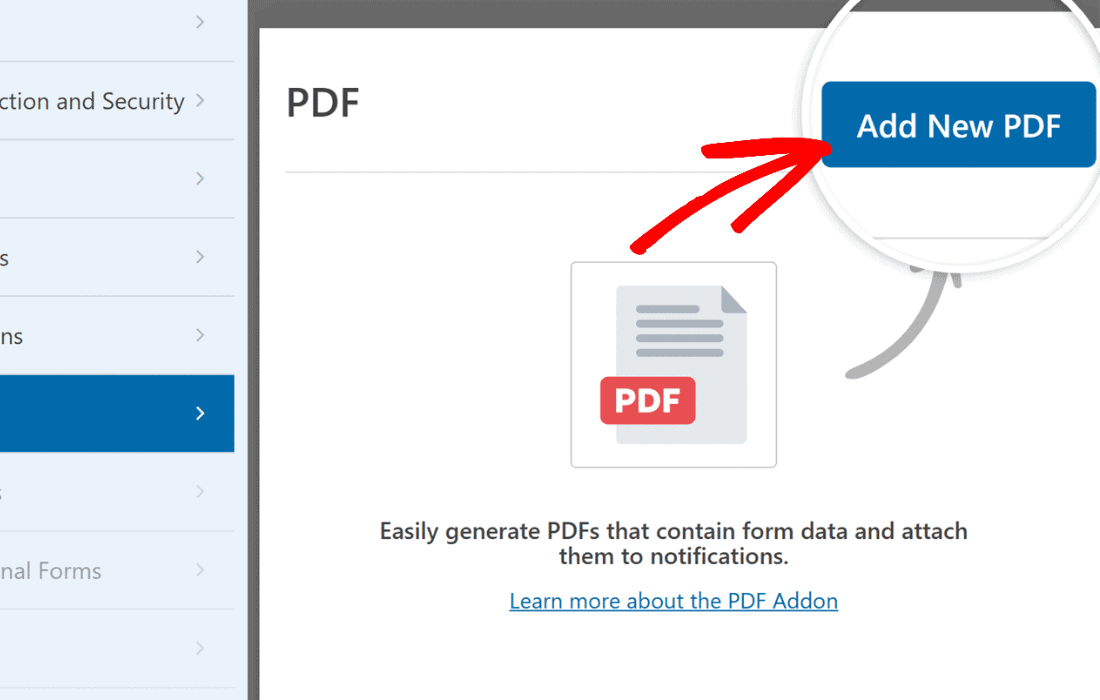
Setting up WPForms PDF is generally straightforward, following the standard WordPress plugin installation process. Once activated, a new “PDF” tab or section usually appears within the WPForms builder interface. The workflow typically follows these steps:
Beyond the administrative benefits, WPForms PDF significantly improves the user experience for the person filling out the form. In the modern digital landscape, users expect immediate confirmation of their actions. Providing a downloadable PDF right on the “Thank You” page or via an instant email attachment gives the user a sense of security and completion. It provides them with a tangible record of their submission that they can save for their own records without having to manually print a webpage or copy-paste text.
While WPForms PDF is a specialized solution for the WPForms ecosystem, there are other reputable plugins in the WordPress space that offer similar PDF generation capabilities for various form builders or general site content.
In conclusion, WPForms PDF is an essential tool for any WordPress site owner looking to professionalize their data collection process. By automating the transition from digital input to physical-ready documentation, it saves time, reduces errors, and provides a superior experience for both administrators and end-users. Its blend of customization, security, and ease of use makes it a top choice for document automation within the WordPress ecosystem.


