

Updates for one year, unlimited sites, auto updates, and regular updates.
$3.99
 BookmarkBookmarked
 The WPForms n8n plugin serves as a powerful bridge between the most intuitive drag-and-drop form builder for WordPress and the highly flexible workflow automation tool, n8n. This integration allows users to move beyond simple form submissions by connecting their website data to a vast ecosystem of over 400 different applications and services. By leveraging the capabilities of n8n—a tool often preferred by developers and privacy-conscious organizations for its self-hosting capabilities—this plugin empowers WordPress administrators to build complex, multi-step automation sequences that trigger the moment a user hits the submit button.
For years, WordPress users relied on basic email notifications to handle form submissions. While effective for simple contact requests, modern business requirements demand more sophisticated data handling. The WPForms n8n plugin represents an evolution in this space, moving away from static data storage toward dynamic, automated processing. Instead of manually exporting CSV files or copy-pasting lead information into a CRM, this plugin ensures that data flows instantly and accurately to the platforms where it is needed most.
The integration is particularly significant for those who utilize n8n as their primary automation engine. Unlike other automation platforms that may charge per task or limit the complexity of workflows, n8n offers a node-based visual interface that allows for intricate logic, branching, and data transformation. The WPForms n8n plugin acts as the essential “trigger” node within this ecosystem, ensuring that every field captured in a WordPress form is correctly mapped and transmitted to the n8n webhook.
The plugin is designed with both simplicity and technical depth in mind, ensuring that it is accessible to beginners while remaining robust enough for advanced developers. Below are the primary features that define the WPForms n8n experience:
Seamless Webhook Integration
The primary mechanism of the plugin is its robust webhook support. When a form is submitted, the plugin packages the entry data into a JSON payload and sends it to a specific n8n production or test URL. This process happens in the background, ensuring that the user experience on the front end remains fast and uninterrupted.
Dynamic Field Mapping
One of the most critical aspects of any integration is ensuring that data ends up in the right place. The WPForms n8n plugin allows for precise field mapping. Whether you are collecting standard information like names and emails or complex data through Likert scales, file uploads, and custom dropdowns, the plugin ensures that each piece of data is identified by its unique ID or label within the n8n environment.
Conditional Logic Support
Not every form submission needs to trigger an automation. The plugin integrates with the native conditional logic features of WPForms, allowing users to set specific rules for when data should be sent to n8n. For example, you might only want to trigger a Slack notification if a user selects “Urgent” from a priority dropdown menu, or only add a user to a mailing list if they have checked a specific consent box.
Secure Data Transmission
Security is a paramount concern when handling user data. The plugin supports secure HTTPS transmissions, ensuring that data is encrypted while in transit between your WordPress site and your n8n instance. Furthermore, it allows for the inclusion of custom headers, which can be used for authentication purposes, ensuring that your n8n webhook only accepts data from authorized sources.
To understand the true value of the WPForms n8n plugin, one must look at how it can be applied across various industries and business models. The flexibility of n8n combined with the ease of WPForms creates a playground for operational efficiency.
Advanced Lead Management and CRM Integration
For sales teams, speed is everything. When a potential client fills out a consultation form, the WPForms n8n plugin can immediately send that data to n8n. From there, n8n can perform a series of automated tasks: it can check if the lead already exists in a CRM like Salesforce or HubSpot, update the record if it does, or create a new one if it doesn’t. It can then assign a lead score based on the form answers and notify the appropriate sales representative via a personalized message in Microsoft Teams.
Automated Customer Support and Ticketing
Customer service departments can use the plugin to streamline their ticketing process. A support form on a WordPress site can trigger an n8n workflow that automatically categorizes the request using AI-based sentiment analysis nodes. If the sentiment is detected as “frustrated,” the workflow can escalate the ticket in Jira or Zendesk and send an automated “we are looking into this immediately” email to the customer, improving satisfaction through rapid response.
Streamlined Human Resources and Onboarding
HR departments often use forms for job applications or internal requests. With the WPForms n8n integration, a job application can trigger a workflow that saves the applicant’s resume to a specific folder in Google Drive or Dropbox, adds their details to an Airtable database for tracking, and sends an invitation for an initial screening call via Calendly. This reduces the administrative burden on HR staff and ensures a professional experience for candidates.
While there are several automation platforms available, n8n offers unique advantages that make the WPForms n8n plugin a preferred choice for many.
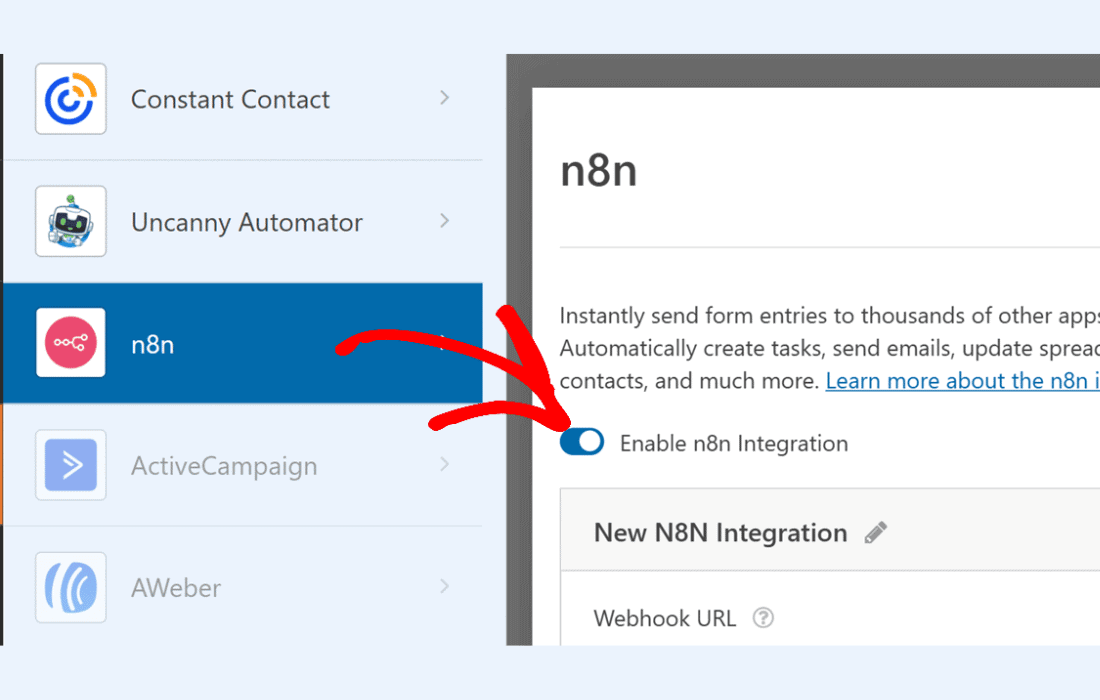
Setting up the WPForms n8n plugin is a straightforward process that follows standard WordPress conventions. Once the plugin is installed and activated, a new “n8n” or “Webhooks” tab typically appears within the WPForms settings for each individual form.
The user begins by creating a new workflow in n8n and adding a “Webhook” node. This node provides a unique URL. The user then copies this URL and pastes it into the settings within the WordPress dashboard. From there, the user can select the request method (usually POST) and choose which form fields should be included in the payload.
A “Test Connection” feature is often included, allowing the administrator to send a sample submission to n8n to verify that the mapping is correct. Once the connection is verified, the n8n workflow can be activated, and the system begins processing live submissions immediately.
For those looking to maximize their investment in these tools, the WPForms n8n plugin supports advanced strategies that go beyond simple data transfer.
Multi-Destination Routing: A single form submission can be sent to multiple different n8n webhooks or handled by a single webhook that branches out into dozens of different directions. This allows for simultaneous updates across marketing, sales, and accounting departments.
Data Transformation Before Delivery: Using n8n’s “Function” nodes, you can transform the data received from WPForms before it reaches its final destination. For example, you can format phone numbers to a standardized international format, calculate values based on form inputs, or even translate text fields into different languages using translation APIs.
Error Handling and Retries: One of the risks of automation is the potential for a service to be down. By using n8n‚Äôs error handling nodes in conjunction with the WPForms trigger, you can build “fail-safe” workflows that retry a task if it fails or log the error in a spreadsheet for manual review, ensuring that no lead or customer request is ever lost.
The WPForms n8n plugin is built to be lightweight. It does not add significant overhead to the WordPress database or slow down the site’s loading speed. Because the heavy lifting of the automation (the “processing”) happens on the n8n server rather than the WordPress server, the impact on website performance is negligible. This separation of concerns is a best practice in web development, ensuring that the user-facing website remains snappy and responsive even when complex backend tasks are being executed.
Furthermore, the plugin is designed to handle high volumes of submissions. Whether your site receives ten submissions a day or ten thousand, the webhook architecture ensures that each entry is queued and processed efficiently.
If you are exploring options for connecting WPForms to external automation services, there are several reputable alternatives available in the WordPress ecosystem.
The WPForms n8n plugin is an essential tool for any organization looking to professionalize their data collection and workflow automation. By combining the user-friendly interface of WPForms with the industrial-strength capabilities of n8n, it provides a solution that is both easy to implement and infinitely scalable. Whether you are looking to automate a simple email sequence or orchestrate a complex multi-platform business process, this integration provides the reliability, security, and flexibility needed to succeed in a data-driven world. By choosing this path, WordPress users gain the freedom to build custom solutions that fit their unique needs, all while maintaining full control over their most valuable asset: their data.


