

Updates for one year, unlimited sites, auto updates, and regular updates.
$3.99
 BookmarkBookmarked
 LaunchGuard Pro – Coming Soon & Maintenance Mode is a comprehensive professional solution designed for WordPress site owners, developers, and agencies who need to manage their website’s public visibility during various stages of development or updates. By providing a sophisticated bridge between the backend development process and the frontend user experience, this plugin ensures that visitors encounter a polished, branded landing page rather than a broken or half-finished website. Whether you are launching a brand-new project, performing routine maintenance, or undergoing a complete site redesign, LaunchGuard Pro offers the tools necessary to maintain your professional image while simultaneously building anticipation and capturing leads.
In the digital landscape, first impressions are often the only impressions a brand gets to make. When a visitor arrives at a website that is under construction or experiencing technical difficulties, a default “Error 404” or a blank white screen can significantly damage brand credibility. LaunchGuard Pro addresses this by allowing administrators to replace the standard site view with a high-quality, customized page. This serves several strategic purposes: it protects the brand’s reputation, keeps the audience informed about the site’s status, and provides a platform for early marketing efforts.
Beyond aesthetics, using a dedicated plugin for these modes is a technical necessity. It allows developers to work on the live server environment‚Äîtesting plugins, themes, and database configurations‚Äîwithout exposing the “messy” middle stages of development to the public. This controlled environment is essential for ensuring that when the site finally goes live, it is fully optimized and bug-free.
One of the core strengths of LaunchGuard Pro is its ability to distinguish between “Coming Soon” and “Maintenance Mode,” which are technically and strategically distinct. The plugin allows users to toggle between these modes with a single click, automatically adjusting the technical headers sent to search engines.
Coming Soon Mode for New Projects
When a site is in Coming Soon mode, LaunchGuard Pro sends a “200 OK” status code to search engines. This signals to Google and Bing that the site is live and ready to be indexed, even if the full content is not yet available. This is crucial for SEO (Search Engine Optimization) because it allows the domain to start gaining authority and age before the official launch. During this phase, the plugin focuses on lead generation, social media growth, and countdowns to build hype.
Maintenance Mode for Existing Sites
Conversely, Maintenance Mode is intended for established websites undergoing temporary updates. In this state, LaunchGuard Pro sends a “503 Service Unavailable” status code. This informs search engine crawlers that the site is temporarily down for maintenance and that they should return later to index the content. This prevents search engines from indexing broken pages or removing the site from search results due to temporary downtime. It is a vital safeguard for maintaining hard-earned SEO rankings during technical transitions.
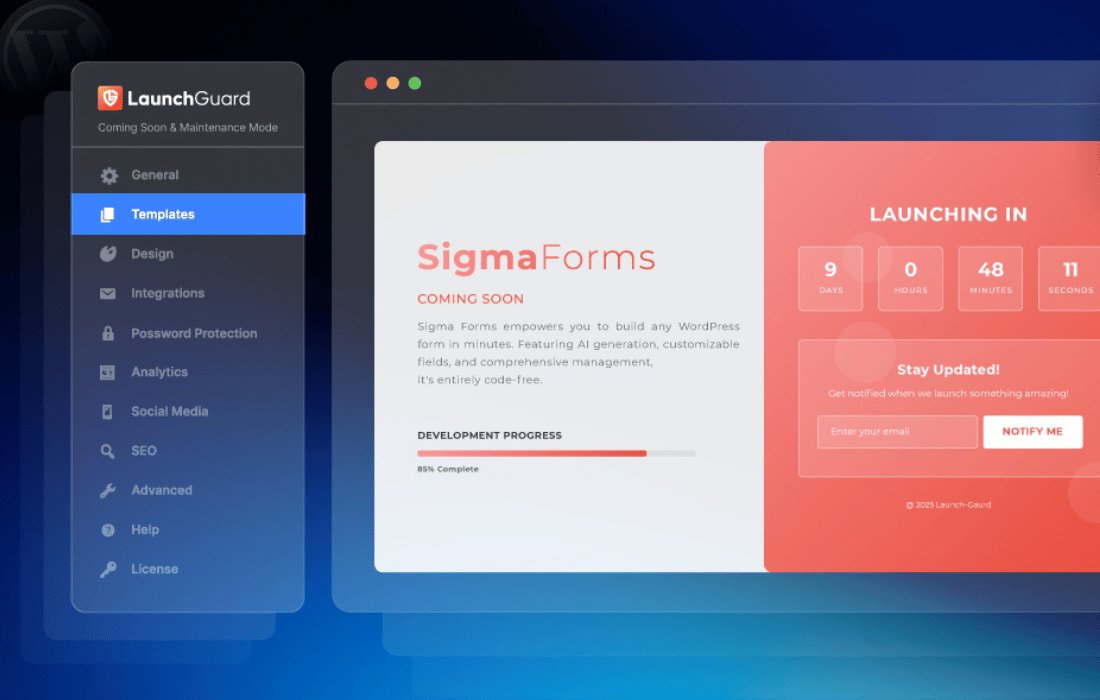
LaunchGuard Pro is built with a focus on user experience, offering a visual editor that requires no coding knowledge. Users can create stunning landing pages that match their brand identity perfectly. The customization suite includes a variety of tools designed to make the page look like a bespoke creation rather than a generic template.
A website that is “under construction” should not be a dead end for marketing. LaunchGuard Pro transforms the maintenance period into an opportunity for growth. By integrating lead capture forms directly into the placeholder page, site owners can start building an email list before the site even launches.
The plugin features seamless integration with popular email marketing services such as Mailchimp, Constant Contact, AWeber, and Campaign Monitor. When a visitor enters their email address to be notified of the launch, the data is automatically synced with the chosen marketing platform. Additionally, the plugin includes social media integration, allowing users to display icons that link to their profiles or even include “Social Share” buttons to encourage visitors to spread the word about the upcoming launch.
A common challenge during site development is allowing clients or team members to see the progress while keeping the general public out. LaunchGuard Pro provides sophisticated access control features that solve this problem without requiring users to create multiple WordPress accounts.
Secret Access Links: Administrators can generate a unique URL that bypasses the maintenance screen. This link can be sent to clients or stakeholders, allowing them to view the full website as it is being built, while everyone else continues to see the “Coming Soon” page.
User Role Whitelisting: The plugin allows for role-based access. For example, an administrator can set the plugin so that anyone logged in as an “Editor” or “Author” can see the live site, while “Subscribers” or logged-out guests are restricted to the maintenance view.
IP Whitelisting: For high-security projects, LaunchGuard Pro supports IP whitelisting. By entering specific IP addresses into the plugin settings, developers can ensure that only specific physical locations (like an office or a home studio) have access to the backend and frontend of the site during the maintenance window.
LaunchGuard Pro is engineered to be lightweight and fast. It does not bloat the WordPress database or slow down the site’s loading speed, which is critical for both user experience and SEO. Beyond the HTTP status codes mentioned earlier, the plugin provides dedicated SEO settings for the placeholder page itself.
Users can define custom Meta Titles and Meta Descriptions for the coming soon page. This ensures that when the site appears in search results during the development phase, the snippet is informative and enticing. Furthermore, the plugin includes a “No-Index” toggle for those who prefer to keep their development site completely hidden from search engines until the final reveal.
Google Analytics integration is also built-in. By simply pasting a tracking ID into the settings, site owners can monitor how much traffic their coming soon page is receiving, where that traffic is coming from, and how many users are interacting with the lead capture forms. This data is invaluable for planning the official launch marketing strategy.
The versatility of LaunchGuard Pro makes it suitable for a wide array of scenarios. Understanding these use cases helps in maximizing the utility of the plugin.
New Business Launches: For a startup, the “Coming Soon” phase is the time to build a “waiting list.” Using the countdown timer feature in LaunchGuard Pro creates a sense of urgency and excitement, encouraging visitors to sign up for early access or launch-day discounts.
Major Version Updates: When a site is undergoing a significant update—such as switching themes or migrating to a new e-commerce platform—Maintenance Mode prevents users from seeing broken layouts or experiencing checkout errors. The plugin can display a friendly message explaining the update and providing an estimated time of return.
Emergency Fixes: If a site is hacked or suffers a critical database error, LaunchGuard Pro can be activated instantly to hide the errors from the public. This gives the technical team the breathing room to resolve the issue without the pressure of a broken public-facing site.
Rebranding Campaigns: During a rebrand, a company may want to hide their old site while they prepare the new visual identity. LaunchGuard Pro allows them to display a “Something New is Coming” teaser that aligns with the new brand aesthetic before the official unveiling.
While LaunchGuard Pro offers a comprehensive suite of features for managing site visibility, there are other established plugins in the WordPress ecosystem that provide similar functionality. If you are exploring different options for your maintenance and coming soon needs, the following plugins are well-regarded in the community:
LaunchGuard Pro – Coming Soon & Maintenance Mode stands out as a professional-grade tool that balances ease of use with deep technical control. By focusing on both the marketing potential of a “Coming Soon” page and the technical requirements of “Maintenance Mode,” it provides a dual-purpose solution that serves the needs of both marketers and developers. Implementing this plugin ensures that your WordPress site remains a professional asset, even when it is not yet ready for the world to see.


