

Updates for one year, unlimited sites, auto updates, and regular updates.
$3.99
 BookmarkBookmarked
 Sigma Media Manager is a comprehensive and high-performance WordPress plugin designed to revolutionize the way website administrators, photographers, and content creators interact with their digital assets. By extending the native capabilities of the WordPress Media Library, this tool provides a sophisticated hierarchical structure that allows for seamless organization, rapid retrieval, and advanced manipulation of images, videos, and documents. Whether managing a small personal blog or a massive enterprise-level multisite network, Sigma Media Manager offers the scalability and precision required to maintain a clean and efficient backend environment.
As WordPress websites grow, the default media library often becomes a bottleneck for productivity. The standard chronological view, while functional for basic needs, quickly becomes unmanageable when dealing with thousands of files. Users often find themselves scrolling endlessly or relying on a basic search function that may not account for specific metadata or categories. Sigma Media Manager addresses these pain points by introducing a logical, folder-based architecture that mirrors the intuitive file management systems found on modern operating systems like Windows or macOS.
By implementing a structured approach to asset management, the plugin reduces the time spent on administrative tasks. Instead of searching for a specific product image uploaded three years ago, users can navigate directly to a dedicated folder. This efficiency is not merely a convenience; it is a critical component of a professional workflow that allows teams to focus on content creation rather than file hunting.
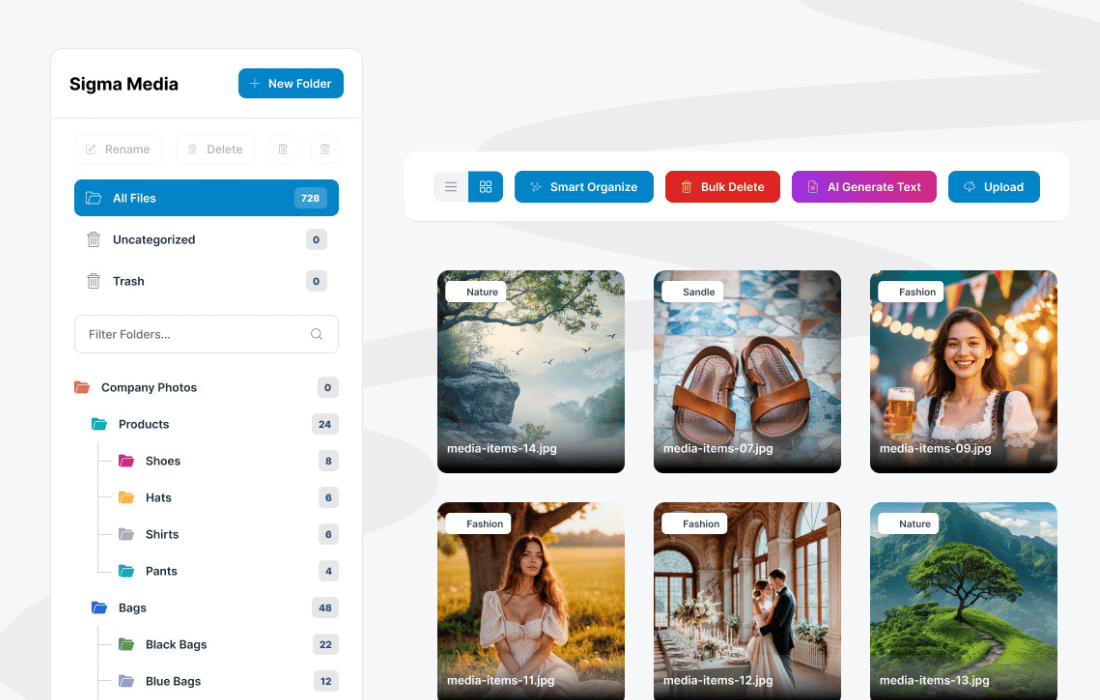
The core functionality of Sigma Media Manager revolves around its advanced folder system. Unlike basic plugins that might move files physically on the server—potentially breaking existing links—Sigma Media Manager utilizes a virtual folder structure. This means that while you can organize your files into an unlimited number of folders and subfolders within the WordPress dashboard, the actual file paths remain stable. This approach ensures that your SEO rankings and internal links are never compromised by organizational changes.
The interface is designed with a focus on user experience, featuring a drag-and-drop sidebar that allows for the instant relocation of files. Users can create, rename, and delete folders with a single click. Furthermore, the plugin supports nested hierarchies, enabling a deep level of categorization. For example, an e-commerce site could have a primary folder for “Products,” with subfolders for “Summer Collection,” and further sub-subfolders for “Footwear” and “Apparel.”
One of the standout features of Sigma Media Manager is its seamless integration of drag-and-drop technology. This functionality is not limited to moving files between folders; it also extends to the upload process. Users can drag files directly from their desktop into a specific folder within the WordPress interface, and the plugin will automatically assign the correct destination. This eliminates the two-step process of uploading and then categorizing, significantly speeding up the content population phase.
The drag-and-drop interface is highly responsive and works across various views, including the grid and list views of the media library. This flexibility ensures that regardless of how a user prefers to view their assets, they maintain full control over the organizational structure. The visual feedback provided during these actions—such as highlighting destination folders—minimizes errors and ensures that files are placed exactly where they are intended to be.
Beyond simple folder organization, Sigma Media Manager enhances the searchability of the media library through advanced filtering options. Users can filter assets by file type, date, author, or even specific metadata. This is particularly useful for sites that handle diverse media formats, such as PDFs, ZIP files, and various video extensions. The plugin’s search engine is optimized to query the database efficiently, providing near-instant results even in libraries containing tens of thousands of items.
Metadata management is another area where Sigma Media Manager excels. The plugin allows for bulk editing of alt text, titles, and descriptions. This is a vital feature for SEO, as it ensures that all images are properly labeled without requiring the user to open every file individually. By maintaining high-quality metadata across the entire library, site owners can improve their visibility in image search results and ensure their site remains accessible to users with visual impairments.
Managing a large-scale media library requires tools that can handle repetitive tasks in bulk. Sigma Media Manager includes a suite of bulk action utilities that allow users to select multiple files and perform operations such as moving, deleting, or renaming in one go. This is particularly useful during site migrations or redesigns when large groups of assets need to be reorganized to fit a new site structure.
A media manager is only as good as its accessibility within the content creation process. Sigma Media Manager is built to be fully compatible with the most popular WordPress page builders, including Elementor, Divi, and Beaver Builder. When you open the media library from within a page builder’s image widget, the Sigma folder structure is right there, allowing you to find your assets without leaving the editing screen.
Furthermore, the plugin integrates seamlessly with the Gutenberg block editor. Whether you are adding a single image block or a gallery, the folder sidebar remains accessible. This deep integration ensures that the organizational benefits of the plugin are available at every touchpoint where media is used, creating a cohesive experience across the entire WordPress ecosystem.
A common concern with media management plugins is the potential impact on site performance. Sigma Media Manager is engineered with a “performance-first” philosophy. It uses optimized database queries to ensure that the addition of folders does not slow down the admin dashboard. The plugin is lightweight and does not load unnecessary scripts on the front end of your website, ensuring that your visitors experience fast load times.
For enterprise-level sites, scalability is key. Sigma Media Manager is capable of handling massive libraries without degradation in speed. It utilizes AJAX for most of its operations, meaning that folder navigation and file movements happen without requiring a full page refresh. This modern approach to web development results in a snappy, application-like feel within the WordPress admin area.
In a multi-user environment, controlling who can access or modify media assets is crucial. Sigma Media Manager provides robust permission settings that allow administrators to restrict folder access based on user roles. For instance, you can allow “Editors” to create and move folders while restricting “Contributors” to only uploading files into specific designated areas.
This level of control is essential for agencies managing client sites or for large editorial teams. By locking down sensitive folders, you can prevent accidental deletion of critical site assets. The plugin also keeps a log of major organizational changes, providing an audit trail that can be useful for troubleshooting or security reviews.
Sigma Media Manager contributes significantly to a site’s SEO strategy. By facilitating better organization and metadata management, it ensures that images are not just stored, but are optimized for search engines. The ability to quickly identify images missing alt text or those with non-descriptive filenames allows for rapid optimization passes.
Additionally, the plugin supports the categorization of images by topic, which can indirectly help with content planning. By seeing all assets related to a specific keyword or category in one folder, content creators can identify gaps in their visual media and ensure a diverse range of imagery is used across the site. The plugin also works harmoniously with popular image compression plugins, ensuring that your organized library is also a fast-loading one.
The versatility of Sigma Media Manager makes it suitable for a wide array of applications. For professional photographers, it serves as a digital asset management (DAM) system where shoots can be organized by date, client, or location. For e-commerce store owners, it provides a way to manage product imagery across different seasons and categories without losing track of a single thumbnail.
Educational institutions can use the plugin to organize vast repositories of documents and instructional videos, making it easy for faculty to find and embed resources into their learning management systems. Even for small business owners, the plugin offers a way to keep marketing materials, logos, and staff photos organized, ensuring that the right version of a file is always used.
If you are looking for alternatives or wish to compare features, several other reputable plugins offer media organization capabilities within the WordPress ecosystem. These tools vary in their interface design and specific feature sets, but all aim to solve the problem of media library clutter.
Sigma Media Manager stands out as a professional-grade solution for anyone serious about maintaining an organized WordPress site. By bridging the gap between a simple upload tool and a full-scale digital asset management system, it empowers users to take full control of their media. The combination of virtual hierarchical folders, deep integration with page builders, and a focus on performance makes it an essential tool for modern web development. By investing in a structured media library, you are not just organizing files; you are optimizing your workflow, improving your SEO, and ensuring the long-term scalability of your digital presence.


